¶ Linking permit files to code enforcement cases
Most of the time a permit file moves through its routine occupancy and inspection steps without any trouble. Occasionally an owner or tenant does not follow the required process, and an officer has to escalate the situation into a formal code enforcement (CE) case.
CNF now records that escalation as a durable, visible link between the permit file and the CE case. Once linked, staff looking at the CE case can see exactly which permit file it grew out of, and staff looking at the permit file can see every case it was escalated to. No more guessing or hunting around the parent property.
This link is:
- Two-way — it shows up on both the permit file and the CE case.
- First-class — it is displayed prominently on both pages, not buried.
- Safe — removing a link only deactivates it; nothing is deleted, and it can be re-created later.
- Same-parcel only — a permit file can only be linked to a CE case on the same parcel.
There are two ways to create a link, described below.
Note: When you transfer violated ordinances from a permit file inspection into a case, CNF also creates this link for you automatically. The two steps below are the manual, on-purpose ways to make the connection.
¶ Where the linkage tool lives
Every permit file profile has a panel titled Escalated to CE case in the left column. This panel is the home base for the linkage tool — it lists the cases this permit file has been escalated to and holds the buttons for creating new links.
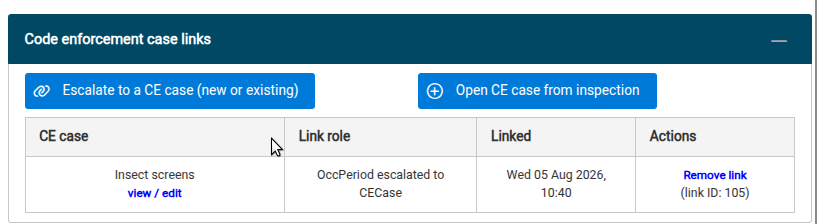
To get to a permit file: open a property profile, find the permit file inside a unit in the upper-right column, and click the view permit file link. See Creating permit files if you need a refresher on reaching a permit file.
¶ Path 1 — Link to an existing CE case
Use this path when a case already exists on the parcel and you simply want to record that this permit file is connected to it.
- On the permit file, locate the Escalated to CE case panel in the left column.
- Click the Escalate to a CE case (new or existing) button.
- A picker dialog opens listing the open CE cases on the same parcel. Only same-parcel cases are shown, because a permit file and a case must share a parcel to be linked.

- Click Link this case on the row for the case you want. The dialog closes and the new link appears in the panel's table.
- CNF records an event on both timelines — an escalation note on the permit file and a linkage note on the CE case — so the connection is captured in the history of each.
- If you cannot find an appropriate case to link, click the Create new CE case button at the bottom of the CE case list. This will open the create new case dialog with sensible defaults pref-filled.
¶ Path 2 — Open a brand-new CE case from a failed inspection
Use this path when there is no case yet and you want to create one directly from the violated ordinances found on a permit file inspection. This path reuses the standard violation-transfer dialog, so the screen will feel familiar if you have moved violations into a case before.
- On the permit file, in the Escalated to CE case panel, click Open a new CE case from a failed inspection.
- A picker dialog opens listing the inspections on this permit file. Choose the inspection whose violated ordinances should seed the new case.
- Click Start new case from this inspection. The violation-transfer dialog opens, already set up to create a new case.
- In the transfer dialog:
- Confirm the new case details (name, manager, date of record). The origination category is pre-set to record that this case originated from an occupancy period.
- Review the list of violated ordinances on the right. Use remove from transfer list on any ordinance you do not want carried over.
- Optionally batch-set a stipulated compliance date for the transferred violations.
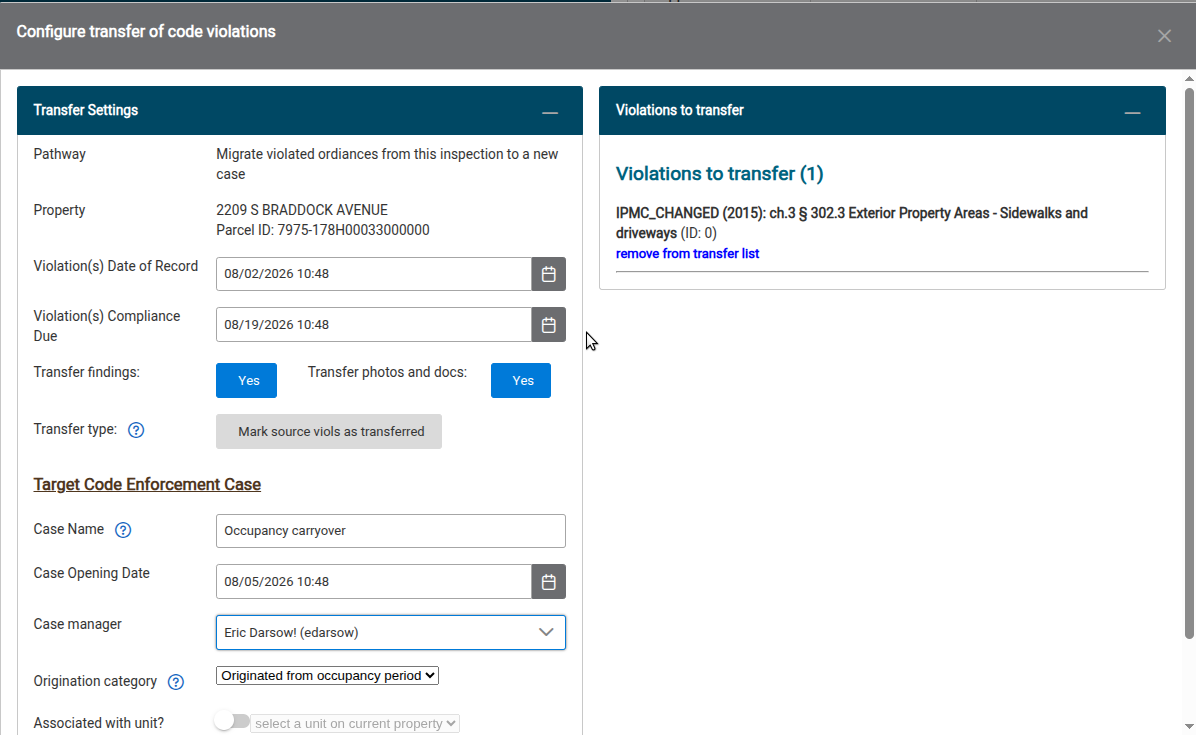
- Click Transfer violations. In one step CNF:
- creates the new CE case,
- carries over the violated ordinances you kept,
- links the new case back to this permit file, and
- records the escalation and origination events on both timelines.
- The results dialog appears with a link to view the new case.
¶ Viewing the link from the CE case
Open any linked CE case and look at its main information panel. The connection appears as a first-class Occupancy connections row (labeled Originated from on the case side), showing the permit file's type, unit, and period ID.
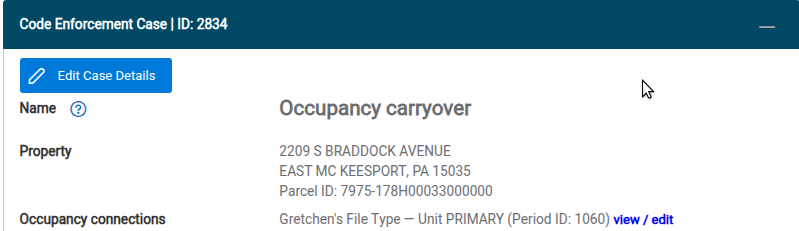
Click view / edit on that row to jump straight back to the permit file the case was escalated from. This is the fast round-trip that lets a reviewer move between the exception (the case) and the routine process it came from (the permit file) without digging through the parent property.
¶ Removing a link
Links are removed softly — the connection is deactivated, never deleted, so it stays in the history and can be re-created. Removing a link will not change any underlying case or inspection fields and can be done safely.
- On the permit file's Escalated to CE case panel, find the row for the link you want to remove.
- Click Remove link.
- A confirmation dialog explains that the link will be deactivated. Click Remove link again to confirm.
NOTE: Auto-generated link events will need to be manually removed if you desire a clean case event history.
¶ Summary
| You want to… | Use |
|---|---|
| Connect this permit file to a case that already exists | Path 1 — Link a CE case |
| Start a new case from violated ordinances on an inspection | Path 2 — Open a new CE case from a failed inspection |
| See where a case came from | The Occupancy connections / Originated from row on the CE case |
| Undo a connection | Remove link on the permit file's Escalated to CE case panel |